A code snippet to set a Date object to the last date of the month:
Calendar cal = Calendar.getInstance();
cal.set(Calendar.DATE, cal.getActualMaximum(Calendar.DATE));
System.out.println(cal.getTime());
The Calendar API has a lot of other utility methods that are very convenient when you need to work on dates.
Tuesday, August 30, 2011


Friday, April 1, 2011
Auto-Build Project in Eclipse using ANT
Eclipse allows you to set your custom ANT file to build your projects. Here's how you can configure the build process to pick your ANT file and not the default Java Builder.
> Right click on Project and select "Properties"
> On the Properties window, click on "Builders"
> Since you want to set your own build process, uncheck the "Java Builder"
> Now we need to configure the ANT file for the project build. Click "New",
select "Ant Builder" and click OK
> Enter a valid name for your builder, select the buildfile and the project root using the "Browse Workspace" button. Use can set a lot of other properties on this window to support the build process like "Arguments", "Targets", etc.
> Once you have your configurations set, click OK
> You should be back on the Builders window, check the builder you just created and click OK
You are now set with your ANT builder and you can view the build output in the console view.
Hope this helps.
> Right click on Project and select "Properties"
> On the Properties window, click on "Builders"
> Since you want to set your own build process, uncheck the "Java Builder"
> Now we need to configure the ANT file for the project build. Click "New",
select "Ant Builder" and click OK
> Enter a valid name for your builder, select the buildfile and the project root using the "Browse Workspace" button. Use can set a lot of other properties on this window to support the build process like "Arguments", "Targets", etc.
> Once you have your configurations set, click OK
> You should be back on the Builders window, check the builder you just created and click OK
You are now set with your ANT builder and you can view the build output in the console view.
Hope this helps.
Wednesday, January 26, 2011
Months between two dates - Java Implementation
A code snippet that will accept two java.util.Date objects and return the number of months between the two dates.
public int getNumberOfMonths(Date fromDate, Date toDate){
int monthCount=0;
Calendar cal = Calendar.getInstance();
cal.setTime(fromDate);
int c1date=cal.get(Calendar.DATE);
int c1month=cal.get(Calendar.MONTH);
int c1year=cal.get(Calendar.YEAR);
cal.setTime(toDate);
int c2date=cal.get(Calendar.DATE);
int c2month=cal.get(Calendar.MONTH);
int c2year=cal.get(Calendar.YEAR);
monthCount = ((c2year-c1year)*12) + (c2month-c1month) + ((c2date>=c1date)?1:0);
return monthCount;
}
Hope this helps!
public int getNumberOfMonths(Date fromDate, Date toDate){
int monthCount=0;
Calendar cal = Calendar.getInstance();
cal.setTime(fromDate);
int c1date=cal.get(Calendar.DATE);
int c1month=cal.get(Calendar.MONTH);
int c1year=cal.get(Calendar.YEAR);
cal.setTime(toDate);
int c2date=cal.get(Calendar.DATE);
int c2month=cal.get(Calendar.MONTH);
int c2year=cal.get(Calendar.YEAR);
monthCount = ((c2year-c1year)*12) + (c2month-c1month) + ((c2date>=c1date)?1:0);
return monthCount;
}
Hope this helps!
Wednesday, August 25, 2010
Oracle XML functions
Few notes and examples on how to generate XML out of oracle database.
Go through this page. It is very self-explanatory and gives really good examples.
The following functions sufficed for all my requirements:
Here's a small example:
Consider the following tables

To generate XML like this:
<Orders>
<Order no="99960"><Person>Kovid Matt</Person></Order>
<Order no="12214"><Person>Kovid Matt</Person></Order>
<Order no="51107"><Person>Jack Svenda</Person></Order>
<Order no="55005"><Person>Jack Svenda</Person></Order>
<Order no="55874"><Person>Jack Svenda</Person></Order>
<Order no="21355"><Person>Amme Harris</Person></Order>
</Orders>
I used
SELECT
XMLElement("Orders",XMLAgg(XMLElement("Order",
XMLAttributes(o.OrderNo AS "no"),
XMLElement("Person",p.FirstName || ' ' || p.LastName))))
FROM Persons p
INNER JOIN Orders o
ON p.P_Id=o.P_Id
For a slightly more complex XML like this,
<Persons>
<Person name="Kovid Matt">
<City>some city</City>
<Orders>
<Order no="99960"></Order>
<Order no="12214"></Order>
</Orders>
</Person>
<Person name="Jack Svenda">
<City>some city</City>
<Orders>
<Order no="51107"></Order>
<Order no="55005"></Order>
<Order no="55874"></Order>
</Orders>
</Person>
<Person name="Amme Harris">
<City>some city</City>
<Orders>
<Order no="21355"></Order>
</Orders>
</Person>
</Persons>
I used
SELECT
XMLElement("Persons",
XMLAgg(XMLElement("Person",
XMLAttributes(p.FirstName || ' ' || p.LastName AS "name"),
XMLElement("City", p.city),
XMLElement("Orders",
(SELECT XMLAgg(XMLElement("Order",
XMLAttributes(o.OrderNo AS "no")))
FROM Orders o
WHERE p.P_Id=o.P_Id)))))
FROM Persons p
There are more utility functions that Oracle offers. I hope this post helps.
Go through this page. It is very self-explanatory and gives really good examples.
The following functions sufficed for all my requirements:
- XMLELEMENT
- XMLATTRIBUTES
- XMLAGG
- XMLCOMMENT
Here's a small example:
Consider the following tables
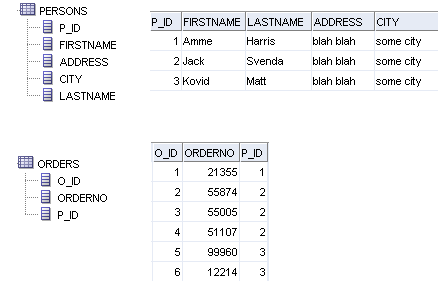
To generate XML like this:
<Orders>
<Order no="99960"><Person>Kovid Matt</Person></Order>
<Order no="12214"><Person>Kovid Matt</Person></Order>
<Order no="51107"><Person>Jack Svenda</Person></Order>
<Order no="55005"><Person>Jack Svenda</Person></Order>
<Order no="55874"><Person>Jack Svenda</Person></Order>
<Order no="21355"><Person>Amme Harris</Person></Order>
</Orders>
I used
SELECT
XMLElement("Orders",XMLAgg(XMLElement("Order",
XMLAttributes(o.OrderNo AS "no"),
XMLElement("Person",p.FirstName || ' ' || p.LastName))))
FROM Persons p
INNER JOIN Orders o
ON p.P_Id=o.P_Id
For a slightly more complex XML like this,
<Persons>
<Person name="Kovid Matt">
<City>some city</City>
<Orders>
<Order no="99960"></Order>
<Order no="12214"></Order>
</Orders>
</Person>
<Person name="Jack Svenda">
<City>some city</City>
<Orders>
<Order no="51107"></Order>
<Order no="55005"></Order>
<Order no="55874"></Order>
</Orders>
</Person>
<Person name="Amme Harris">
<City>some city</City>
<Orders>
<Order no="21355"></Order>
</Orders>
</Person>
</Persons>
I used
SELECT
XMLElement("Persons",
XMLAgg(XMLElement("Person",
XMLAttributes(p.FirstName || ' ' || p.LastName AS "name"),
XMLElement("City", p.city),
XMLElement("Orders",
(SELECT XMLAgg(XMLElement("Order",
XMLAttributes(o.OrderNo AS "no")))
FROM Orders o
WHERE p.P_Id=o.P_Id)))))
FROM Persons p
There are more utility functions that Oracle offers. I hope this post helps.
Monday, August 9, 2010
Ext 2.2 Prevent GridPanel's rowclick handler to execute on rowdblclick
I had a requirement where I needed to perform different actions on a single click and a double click on a row in a GridPanel. I was using a Ext.grid.GridPanel and handling "rowclick" and "rowdblclick" events. I noticed that even on a double click, the row click event was fired always. I could very well ignore it, but an unnecessary action was being performed.
Here's how I prevented rowclick's action to be performed on a rowdblclick:
I defined a DelayedTask, used it to perform the rowclick action after a little time delay and cancelled the task on rowdblclick.
var rowClickTask = new Ext.util.DelayedTask();
var myGrid = new Ext.grid.GridPanel({
.
.
.
listeners: {
rowclick : function(){
rowClickTask.delay(200,singleClickAction,this);
},
rowdblclick: function(){
rowClickTask.cancel();
doubleClickAction();
}
}
});
This might not be the best way of handling this issue, but it works for me :)
Here's how I prevented rowclick's action to be performed on a rowdblclick:
I defined a DelayedTask, used it to perform the rowclick action after a little time delay and cancelled the task on rowdblclick.
var rowClickTask = new Ext.util.DelayedTask();
var myGrid = new Ext.grid.GridPanel({
.
.
.
listeners: {
rowclick : function(){
rowClickTask.delay(200,singleClickAction,this);
},
rowdblclick: function(){
rowClickTask.cancel();
doubleClickAction();
}
}
});
This might not be the best way of handling this issue, but it works for me :)
Friday, July 23, 2010
Integrating Google Spreadsheets - Part 2
In my last post, I elaborated on how I have used the Google Documents List Data API and the Spreadsheets Data API to integrate Google Docs in my application. In this post, I will explain on how I provided online access to the spreadsheets to my application users. The users were not required to sign on to Google manually, I used SAML to sign them on and access the docs. To read more about how SAML works with Google, go through this article. The article is very helpful and
Before you make any changes in the application, you need to have administrator access to the Google apps account. You can enable provisioning API for programmatic account mgmt(I didn't). You need the following information about your application:
1. Login page
2. Logout page
3. Change password page
4. Certificate file (more info here)
Once you have the above information, log on to your Google Apps account. Go to the "Advanced tools" tab and click on "Set up single sign-on (SSO)". Once on the SSO page, enable SSO, enter the page details and upload the certificate file. Remember to save the changes. You can also create more user accounts to allow for better access control and user management. That's pretty much it on configuring the Google Apps for SSO. After you have saved your changes, go to the Dashboard and copy the Docs Service url (should be http://docs.google.com/a/). Try hitting the url, if you are redirected to the login page you entered in the SSO setup, things are going fine!
Now you need to provide implementation for SAML in your application. Go through this article, it has reference implementation for SAML-based SSO for the docs. Download the code and run the application. It will help you understand the way SAML works by printing the request, response, reference URLs and so on.
I used the example as the base reference in my development. I utilized the util classes AS-IS, and wrote the servlet implementation for the ProcessResponseServlet. The login() method needs to be updated to utilize your application's authentication mechanism. I also put in custom implementations in the service(doGet() and doPost()) method for the SSO process.
After these changes are made, you are pretty much done. Deploy your application, hit the Docs Service url again, it should redirect you to the login page, enter your applications credentials and your should be redirected to the Google Docs page.
Just as a side note, in my implementation, users had to be already authenticated to my application to be able access the Google Docs. I attached one Google user account with a group of my application users. When a user tried to access Google Docs, my SAML response servlet picked the Google account associated with the user and processed the SAML response.
Before you make any changes in the application, you need to have administrator access to the Google apps account. You can enable provisioning API for programmatic account mgmt(I didn't). You need the following information about your application:
1. Login page
2. Logout page
3. Change password page
4. Certificate file (more info here)
Once you have the above information, log on to your Google Apps account. Go to the "Advanced tools" tab and click on "Set up single sign-on (SSO)". Once on the SSO page, enable SSO, enter the page details and upload the certificate file. Remember to save the changes. You can also create more user accounts to allow for better access control and user management. That's pretty much it on configuring the Google Apps for SSO. After you have saved your changes, go to the Dashboard and copy the Docs Service url (should be http://docs.google.com/a/
Now you need to provide implementation for SAML in your application. Go through this article, it has reference implementation for SAML-based SSO for the docs. Download the code and run the application. It will help you understand the way SAML works by printing the request, response, reference URLs and so on.
I used the example as the base reference in my development. I utilized the util classes AS-IS, and wrote the servlet implementation for the ProcessResponseServlet. The login() method needs to be updated to utilize your application's authentication mechanism. I also put in custom implementations in the service(doGet() and doPost()) method for the SSO process.
After these changes are made, you are pretty much done. Deploy your application, hit the Docs Service url again, it should redirect you to the login page, enter your applications credentials and your should be redirected to the Google Docs page.
Just as a side note, in my implementation, users had to be already authenticated to my application to be able access the Google Docs. I attached one Google user account with a group of my application users. When a user tried to access Google Docs, my SAML response servlet picked the Google account associated with the user and processed the SAML response.
Thursday, July 22, 2010
Integrating Google Spreadsheets - Part 1
Here is a detailed description of how I integrated Google Spreadsheets into my application (I have broken the article in two posts):
My project required online access of the spreadsheets as well as being able to use their APIs to fetch, search, upload, download, read and delete spreadsheets.
In this first post, I explain on how I used their APIs to interact with the online docs.
Before moving any further, check out their online documentation of the APIs - Google Documents List Data API and Google Spreadsheets Data API
Here's a list of operations I performed using the APIs:
In the next post, I will elaborate on how I provided online access to users of my application to access the Spreadsheets online.
My project required online access of the spreadsheets as well as being able to use their APIs to fetch, search, upload, download, read and delete spreadsheets.
In this first post, I explain on how I used their APIs to interact with the online docs.
Before moving any further, check out their online documentation of the APIs - Google Documents List Data API and Google Spreadsheets Data API
Here's a list of operations I performed using the APIs:
- Upload spreadsheets - I created the spreadsheets in my application(POI), filled them with content and evaluated the formulae. Then , i created a SpreadsheetEntry object and called the insert() method of the DocsService class. After the upload, I stored the resourceId of the entry in my application (that's the key to the doc just uploaded)
- Download spreadsheets - The APIs give a variety of download options, I used the xls option (4), created the export URL using the resourceId, and used the MediaSource class. Remember, to download spreadsheets, you need a valid SpreadsheetService token.
- Fetch spreadsheets - Same as handling the download option.
- Search within spreadsheets - Used the DocumentQuery class to create the query and the used the getFeed() method of the DocsService class. Check out the various url options for the DocumentQuery class, they really help to fasten search.
- Delete spreadsheets - Fetch the DocumentListEntry object of the document u need to delete, then call the DocsService's delete() method.
- Update/Read/Write cell contents - I found working with their cell-based APIs little slow, and since my requirement always involved reading and writing a lot of content, I used to download the spreadsheet, work on the local copy and then upload it back.
In the next post, I will elaborate on how I provided online access to users of my application to access the Spreadsheets online.
Thursday, July 1, 2010
Generating XSD from XML
I came across a nice tool to generate XSD file from a XML data file. It pretty clean and easy to use.
The tool is known as Trang and can be downloaded from here. I used the "trang-20030619.zip" version.
Here's how I generated the xsd file:
1. Extract/Unzip the zip file(trang-20030619.zip).
2. You will find a .jar file in the extracted folder - trang.jar
3. Go to the folder and use this jar to create the xsd from the xml file
c:\[trang folder path]> trang.jar [xml file].xml [xsd file].xsd
Done! Simple, isn't it!
The tool is known as Trang and can be downloaded from here. I used the "trang-20030619.zip" version.
Here's how I generated the xsd file:
1. Extract/Unzip the zip file(trang-20030619.zip).
2. You will find a .jar file in the extracted folder - trang.jar
3. Go to the folder and use this jar to create the xsd from the xml file
c:\[trang folder path]> trang.jar [xml file].xml [xsd file].xsd
Done! Simple, isn't it!
Monday, June 14, 2010
Using Eclipse WTP for SOAP based Web Services
I have started using Apache Axis2 as a standard engine for SOAP based web-services. To make my job easy(super easy) I am utilizing the WTP project for Eclipse IDE.
While I am still at a learning stage, I came across this tutorial that gave me a good understanding of the platform and explained on a quick example of building and deploying a SOAP based web-service. It also created a small test client for the Axis2 web service runtime.
I had a couple of issues while setting up the service, few libraries were missing and an entry in the web.xml had to be changed. Here are my notes:
1. If the server throws NoClassDef error for "AxisAdminServlet", go to web.xml and change the entry to point to org.apache.axis2.webapp.AxisAdminServlet.
2. You need to add httpcore-x.x.jar, XMLBean's jars and JAX-WS's jars if they are not already present in your CLASSPATH.
To create a Axis web service runtime, you can follow this tutorial.
Notice the difference in the stub and skeleton classes that both the runtimes create.
While I am still at a learning stage, I came across this tutorial that gave me a good understanding of the platform and explained on a quick example of building and deploying a SOAP based web-service. It also created a small test client for the Axis2 web service runtime.
I had a couple of issues while setting up the service, few libraries were missing and an entry in the web.xml had to be changed. Here are my notes:
1. If the server throws NoClassDef error for "AxisAdminServlet", go to web.xml and change the
2. You need to add httpcore-x.x.jar, XMLBean's jars and JAX-WS's jars if they are not already present in your CLASSPATH.
To create a Axis web service runtime, you can follow this tutorial.
Notice the difference in the stub and skeleton classes that both the runtimes create.
Friday, June 4, 2010
Passing Objects in Javascript methods
I recently came across a requirement where I needed to call Javascript methods embedded in a flash module. The flash module was a chart from Fusion charts, and I wanted to perform certain client side actions when user clicked on these charts. Based on certain conditions and where the user clicked, I had to vary the number of parameters I pass to the javascript method.
I was looking for possible solutions and I figured out that the best way to achieve this was passing JSON objects as parameters. Here is how i did it:
link='javascript:jsMethod(%26apos;{\"param1\":\"param1Val\",\"param2\":\"param2Val\",\"param3\":\"param3Val\",\"param4\":\"param4Val\"}%26apos;)'
Note: I needed to escape single quote(') with %26apos; and double quotes(") with \". One can also use ' for single quote, and \x22 for double.
This approach of using JSON to pass variable number of parameters can be used in a variety of ways and keeps the method signature consistent.
This works for me, in case you have a better solution, please do write a comment.
I was looking for possible solutions and I figured out that the best way to achieve this was passing JSON objects as parameters. Here is how i did it:
link='javascript:jsMethod(%26apos;{\"param1\":\"param1Val\",\"param2\":\"param2Val\",\"param3\":\"param3Val\",\"param4\":\"param4Val\"}%26apos;)'
Note: I needed to escape single quote(') with %26apos; and double quotes(") with \". One can also use ' for single quote, and \x22 for double.
This approach of using JSON to pass variable number of parameters can be used in a variety of ways and keeps the method signature consistent.
This works for me, in case you have a better solution, please do write a comment.
Tuesday, June 1, 2010
Ext 2.2 RadioGroup getValue()/setValue()
There seems to be issues with the getValue() and setValue() methods of the Ext.form.RadioGroup class in the 2.2 API version. The methods do not seem to work the way they are supposed to. If you have to use these methods, you need to override them. Here's the override script and some sample code on how to use the RadioGroup class.
Override code:
Ext.override(Ext.form.RadioGroup, {
getName: function(){
return this.items.first().name;
},
getValue: function(){
var v;
if (this.rendered) {
this.items.each(function(item){
if (!item.getValue())
return true;
v = item.getRawValue();
return false;
});
}
else {
for (var k in this.items) {
if (this.items[k].checked) {
v = this.items[k].inputValue;
break;
}
}
}
return v;
},
setValue: function(v){
if (this.rendered){
this.items.each(function(item){
item.setValue(item.getRawValue() == v);
});
}
else {
for (var k in this.items) {
this.items[k].checked = this.items[k].inputValue == v;
}
}
}
});
RadioGroup:
{
xtype: 'radiogroup',
fieldLabel: 'Male/Female',
id:'rg1',
items: [
{boxLabel: 'Male', name: 'gender', inputValue: 1},
{boxLabel: 'Female', name: 'gender' ,inputValue: 2, checked: true}
]
}
Ext.getCmp('rg1').setValue(1);
Ext.getCmp('rg1').getValue();
Hope it helps!!
Override code:
Ext.override(Ext.form.RadioGroup, {
getName: function(){
return this.items.first().name;
},
getValue: function(){
var v;
if (this.rendered) {
this.items.each(function(item){
if (!item.getValue())
return true;
v = item.getRawValue();
return false;
});
}
else {
for (var k in this.items) {
if (this.items[k].checked) {
v = this.items[k].inputValue;
break;
}
}
}
return v;
},
setValue: function(v){
if (this.rendered){
this.items.each(function(item){
item.setValue(item.getRawValue() == v);
});
}
else {
for (var k in this.items) {
this.items[k].checked = this.items[k].inputValue == v;
}
}
}
});
RadioGroup:
{
xtype: 'radiogroup',
fieldLabel: 'Male/Female',
id:'rg1',
items: [
{boxLabel: 'Male', name: 'gender', inputValue: 1},
{boxLabel: 'Female', name: 'gender' ,inputValue: 2, checked: true}
]
}
Ext.getCmp('rg1').setValue(1);
Ext.getCmp('rg1').getValue();
Hope it helps!!
Thursday, May 27, 2010
Using Oracle to search text documents
We can use Oracle*Text utility to search through large amounts of text stored in documents like MS-Word, MS-xls , PDF, XML, HTML, RTF or txt.
Oracle Text(also known as interMedia Text and ConText) is an extensive full text indexing technology allowing you to parse through a large text column and efficiently query free text.
Oracle Text has several index types. However to search large amounts of text, we need to use the CONTEXT Index.
To achieve the search capability, I store the documents in a BLOB column. Using a CLOB is preferable if only plain text documents are being used. Lets assume our table is named "USER_DOCUMENTS" and it has a BLOB column "DOC" that stores the actual file. To create the CONTEXT type index on the "DOC" column we need to:
CREATE INDEX user_documents_index ON user_documents(doc) INDEXTYPE IS CTXSYS.CONTEXT;
Now to perform free text search on the documents we need to use the CONTAINS clause. The Oracle's basic syntax is:
CONTAINS(
[schema.]column,
text_query VARCHAR2
[,label NUMBER])
RETURN NUMBER;
[schema.]column:
Specify the text column to be searched on. This column must have a Text index associated with it.
text_query:
the query expression that defines your search in column.
label:
Optionally specify the label that identifies the score generated by the CONTAINS operator.
Returns:
For each row selected, CONTAINS returns a number between 0 and 100 that indicates how relevant the document row is to the query. The number 0 means that Oracle Text found no matches in the row.
Note:
The CONTAINS operator must be followed by an expression such as > 0, which specifies that the score value calculated must be greater than zero for the row to be selected.
For example, to search for 'oracle' in all the docs of the user_documents table, we will fire:
SELECT SCORE(1), ud.* from user_documents ud WHERE CONTAINS(doc, 'oracle', 1) > 0 ORDER BY SCORE(1) DESC;
The query will return a list of all the docs having the keyword 'oracle' and sort them based on their relevance.
Also, remember to rebuild the index everytime you add docs to the table during development and testing phase. For production systems, based on your load and usage, decide an optimal build schedule.
Hope this helps!
Oracle Text(also known as interMedia Text and ConText) is an extensive full text indexing technology allowing you to parse through a large text column and efficiently query free text.
Oracle Text has several index types. However to search large amounts of text, we need to use the CONTEXT Index.
To achieve the search capability, I store the documents in a BLOB column. Using a CLOB is preferable if only plain text documents are being used. Lets assume our table is named "USER_DOCUMENTS" and it has a BLOB column "DOC" that stores the actual file. To create the CONTEXT type index on the "DOC" column we need to:
CREATE INDEX user_documents_index ON user_documents(doc) INDEXTYPE IS CTXSYS.CONTEXT;
Now to perform free text search on the documents we need to use the CONTAINS clause. The Oracle's basic syntax is:
CONTAINS(
[schema.]column,
text_query VARCHAR2
[,label NUMBER])
RETURN NUMBER;
[schema.]column:
Specify the text column to be searched on. This column must have a Text index associated with it.
text_query:
the query expression that defines your search in column.
label:
Optionally specify the label that identifies the score generated by the CONTAINS operator.
Returns:
For each row selected, CONTAINS returns a number between 0 and 100 that indicates how relevant the document row is to the query. The number 0 means that Oracle Text found no matches in the row.
Note:
The CONTAINS operator must be followed by an expression such as > 0, which specifies that the score value calculated must be greater than zero for the row to be selected.
For example, to search for 'oracle' in all the docs of the user_documents table, we will fire:
SELECT SCORE(1), ud.* from user_documents ud WHERE CONTAINS(doc, 'oracle', 1) > 0 ORDER BY SCORE(1) DESC;
The query will return a list of all the docs having the keyword 'oracle' and sort them based on their relevance.
Also, remember to rebuild the index everytime you add docs to the table during development and testing phase. For production systems, based on your load and usage, decide an optimal build schedule.
Hope this helps!
Friday, May 21, 2010
Java Keytool - Self-Signed SSL Certificate
Keytool is a key and certificate management utility.
In this post, I list down a few useful commands that will help you generate self-signed certificates for development purposes. For production systems, do not use keytool to generate certificates. Use those provided by CAs like VeriSign or thawte. Self-signed certificates are challenged by browsers and that creates a poor user interaction every time they go to your site.
Definitions:
Keystore - A keystore is a database (usually a file) that can contain trusted certificates and combinations of private keys with their corresponding certficiates.
Alias - All keystore entries (key and trusted certificate entries) are accessed via unique aliases
cacerts - The "cacerts" file represents a system-wide keystore with CA certificates. It resides in the security properties directory, $JAVA_HOME/jre/lib/security
Certificate - A certificate (also known as a public-key certificate) is a digitally signed statement from one entity (the issuer), saying that the public key (and some other information) of another entity (the subject) has some specific value.
Prerequisites:
-> JDK 1.3+ installed and JAVA_HOME set to the directory where you have installed JDK
Notes:
-> For this example, lets call our alias "my_alias"
-> For this example, lets call our certificate "my_cert.crt"
Go to $JAVA_HOME/bin directory
# Generate the keystore file (the following command will ask few questions, at the end it will generate a .keystore file - changeit is the password, you can put whatever you want to, just dont forget it :))
> keytool -genkey -alias my_alias -keypass changeit -keyalg RSA
# Export the .keystore file to generate the certificate (the following command will ask for the password and then generate a my_cert.crt file)
> keytool -export -alias my_alias -keypass changeit -file my_cert.crt
At this stage we have the certificate file ready, we can use this certificate file and point our server's trustedFile source to it. However for certain services like CAS, the certificate needs to be imported in JDK trusted certificate file - cacerts.
# Import the certificate file to the cacerts file (the following command will ask for the password and confirm the certificate you are trying to import)
> keytool -import -file my_cert.crt -keypass changeit -keystore $JAVA_HOME/jre/lib/security/cacerts
Other useful keytool commands
# List all .keystore certificates
> keytool -list -v
# List one .keystore certificate
> keytool -list -v -alias my_alias
# List all .keystore certificates in a specific keystore
> keytool -list -keystore
# Remove certificate from cacerts file
> keytool -delete -alias my_alias -keystore $JAVA_HOME/jre/lib/security/cacerts
#Remove a certificate from the default .keystore
> keytool -delete -alias my_alias
As always there is "man" help available!
Hope this helps!
In this post, I list down a few useful commands that will help you generate self-signed certificates for development purposes. For production systems, do not use keytool to generate certificates. Use those provided by CAs like VeriSign or thawte. Self-signed certificates are challenged by browsers and that creates a poor user interaction every time they go to your site.
Definitions:
Keystore - A keystore is a database (usually a file) that can contain trusted certificates and combinations of private keys with their corresponding certficiates.
Alias - All keystore entries (key and trusted certificate entries) are accessed via unique aliases
cacerts - The "cacerts" file represents a system-wide keystore with CA certificates. It resides in the security properties directory, $JAVA_HOME/jre/lib/security
Certificate - A certificate (also known as a public-key certificate) is a digitally signed statement from one entity (the issuer), saying that the public key (and some other information) of another entity (the subject) has some specific value.
Prerequisites:
-> JDK 1.3+ installed and JAVA_HOME set to the directory where you have installed JDK
Notes:
-> For this example, lets call our alias "my_alias"
-> For this example, lets call our certificate "my_cert.crt"
Go to $JAVA_HOME/bin directory
# Generate the keystore file (the following command will ask few questions, at the end it will generate a .keystore file - changeit is the password, you can put whatever you want to, just dont forget it :))
> keytool -genkey -alias my_alias -keypass changeit -keyalg RSA
# Export the .keystore file to generate the certificate (the following command will ask for the password and then generate a my_cert.crt file)
> keytool -export -alias my_alias -keypass changeit -file my_cert.crt
At this stage we have the certificate file ready, we can use this certificate file and point our server's trustedFile source to it. However for certain services like CAS, the certificate needs to be imported in JDK trusted certificate file - cacerts.
# Import the certificate file to the cacerts file (the following command will ask for the password and confirm the certificate you are trying to import)
> keytool -import -file my_cert.crt -keypass changeit -keystore $JAVA_HOME/jre/lib/security/cacerts
Other useful keytool commands
# List all .keystore certificates
> keytool -list -v
# List one .keystore certificate
> keytool -list -v -alias my_alias
# List all .keystore certificates in a specific keystore
> keytool -list -keystore
# Remove certificate from cacerts file
> keytool -delete -alias my_alias -keystore $JAVA_HOME/jre/lib/security/cacerts
#Remove a certificate from the default .keystore
> keytool -delete -alias my_alias
As always there is "man" help available!
Hope this helps!
Thursday, May 20, 2010
Javascript Cookies
In one of my earlier posts I had handled cookies in JSP. Here are a few methods to handle cookies using Javascript. I have written three methods that will do all that you need to manage cookies
1. Write/Create cookie
2. Read Cookie
3. Delete Cookie (Write the cookie with a prior date)

Hopefully, this helps.
1. Write/Create cookie
2. Read Cookie
3. Delete Cookie (Write the cookie with a prior date)

Hopefully, this helps.
Monday, April 19, 2010
Parse File Using Scanner - Java Implementation
Code snippet to parse a file using java.util.Scanner class.

Usage: Call the tokenizeUsingScanner method and pass it the File object and the delimiter for the file.
Note: The pipe symbol has special meaning in a regex -- so you need to escape it.

Usage: Call the tokenizeUsingScanner method and pass it the File object and the delimiter for the file.
Note: The pipe symbol has special meaning in a regex -- so you need to escape it.
Tuesday, April 13, 2010
List all files in a folder - Java Implementation
A code snippet that recursively reads all the files in a folder and put them in a list

Usage:
Call the readFolder method and pass it the absolute folder path as a string.

Usage:
Call the readFolder method and pass it the absolute folder path as a string.
Sunday, April 4, 2010
Fibonacci Number Series - Java Implementation
Posting a code snippet to generate a list of fibonacci numbers:

Usage:
Pass the number of fibonacci numbers you want to generate as a parameter
Returns a list of fibonacci numbers

Usage:
Pass the number of fibonacci numbers you want to generate as a parameter
Returns a list of fibonacci numbers
Monday, March 15, 2010
IE Debugging - Using Fiddler and IE Developer tools
I have been developing web applications for a long time and I have gone through the pain of debugging them by putting "alert" stmts after each line of code.
Until Firebug came to the rescue. God bless the Firebug team! Firebug is such a strong tool that I almost immediately dumped IE and did all my development on FireFox. Firebug's debugging capabilities, HTTP tracking, dynamic content editing, DOM inspection were just too good to believe. And, very frankly I used to curse IE if something worked on FF and not on IE, since I had to go back to the "alert" approach.
Not anymore! I had started using Fiddler some time back but didnt find it very useful as my application was on HTTPS. After the release of Fiddler2 I am able to track each and every request and response. I have also started using the bundled Developer Tools in IE8 (under Tools menu or F12) that allow me to debug my JS scripts, check my CSS, inspect my HTML, check my browser cache and profile my pages. However, the developer tools are clunky, not very intutive and keeps crashing, but you would get used to it!
Few tips on using Fiddler2 efficiently:
Using Fiddler2 alongside the Developer Tools, I can use IE as my development browser, but I have got so used to Firebug now, that I am gonna stick with it for a while!
Until Firebug came to the rescue. God bless the Firebug team! Firebug is such a strong tool that I almost immediately dumped IE and did all my development on FireFox. Firebug's debugging capabilities, HTTP tracking, dynamic content editing, DOM inspection were just too good to believe. And, very frankly I used to curse IE if something worked on FF and not on IE, since I had to go back to the "alert" approach.
Not anymore! I had started using Fiddler some time back but didnt find it very useful as my application was on HTTPS. After the release of Fiddler2 I am able to track each and every request and response. I have also started using the bundled Developer Tools in IE8 (under Tools menu or F12) that allow me to debug my JS scripts, check my CSS, inspect my HTML, check my browser cache and profile my pages. However, the developer tools are clunky, not very intutive and keeps crashing, but you would get used to it!
Few tips on using Fiddler2 efficiently:
- I was unable to track requests originating from localhost. I followed what the team at Fiddler suggested. It works, although if you still want to stick with localhost you can use it this way-
https://localhost.:8080/myapp/.. ("dot" after localhost) - To inspect the request parameters, I prefer to use the "WebForms" section in the request area.
- To check the response, you can use either the "Raw" or "XML" section in the response area.
Using Fiddler2 alongside the Developer Tools, I can use IE as my development browser, but I have got so used to Firebug now, that I am gonna stick with it for a while!
Monday, March 8, 2010
Convert Excel Columns to Number
A code snippet that contains a utility method to get the column number from a column character, e.g. A -> 0 or AA -> 26
public int getColumnCount(String column, int multiplyFactor){
int col=0;
int minusFactor = -10;
if(column.length()==1){
col = minusFactor + Character.getNumericValue(column.charAt(0));
}else{
multiplyFactor += minusFactor + Character.getNumericValue(column.charAt(0)) ;
col = 26 * multiplyFactor + getColumnCount(column.substring(1),multiplyFactor+25);
}
return col;
}
Usage:
int colCount = getColumnCount(String columnChar,1)
Hope this helps!
public int getColumnCount(String column, int multiplyFactor){
int col=0;
int minusFactor = -10;
if(column.length()==1){
col = minusFactor + Character.getNumericValue(column.charAt(0));
}else{
multiplyFactor += minusFactor + Character.getNumericValue(column.charAt(0)) ;
col = 26 * multiplyFactor + getColumnCount(column.substring(1),multiplyFactor+25);
}
return col;
}
Usage:
int colCount = getColumnCount(String columnChar,1)
Hope this helps!
Friday, March 5, 2010
Convert Numbers To Excel Columns
Another code snippet that contains a utility method to get the column character from a column number, e.g. 0 -> A or 26 -> AA
public String convertColumnNumberToChars( int i ){
int iBase = 26;
String interConversion = Integer.toString(i, iBase).toUpperCase();
char[] ac = interConversion.toCharArray();
for( int j = 0; j < ac.length; j++ ) {
int arrLen = ac.length - j - 1;
char c = ac[j];
ac[j] = (char) ('A' - arrLen + Character.digit( c, iBase ));
}
return String.copyValueOf( ac );
}
Usage:
String colChar = convertColumnNumberToChars(int columnCount)
In the next post i will also put down a method to convert a column character to column number.
public String convertColumnNumberToChars( int i ){
int iBase = 26;
String interConversion = Integer.toString(i, iBase).toUpperCase();
char[] ac = interConversion.toCharArray();
for( int j = 0; j < ac.length; j++ ) {
int arrLen = ac.length - j - 1;
char c = ac[j];
ac[j] = (char) ('A' - arrLen + Character.digit( c, iBase ));
}
return String.copyValueOf( ac );
}
Usage:
String colChar = convertColumnNumberToChars(int columnCount)
In the next post i will also put down a method to convert a column character to column number.
Subscribe to:
Posts (Atom)

