Showing posts with label oracle. Show all posts

Wednesday, August 25, 2010

Oracle XML functions

Few notes and examples on how to generate XML out of oracle database.

Go through this page. It is very self-explanatory and gives really good examples.
The following functions sufficed for all my requirements:

  • XMLELEMENT

  • XMLATTRIBUTES

  • XMLAGG

  • XMLCOMMENT


Here's a small example:
Consider the following tables
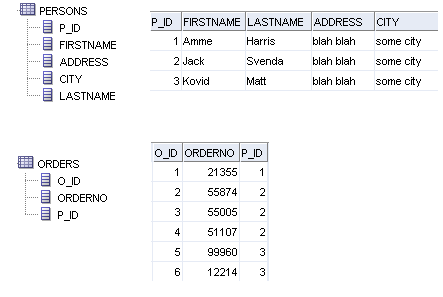

To generate XML like this:

<Orders>
  <Order no="99960"><Person>Kovid Matt</Person></Order>
  <Order no="12214"><Person>Kovid Matt</Person></Order>
  <Order no="51107"><Person>Jack Svenda</Person></Order>
  <Order no="55005"><Person>Jack Svenda</Person></Order>
  <Order no="55874"><Person>Jack Svenda</Person></Order>
  <Order no="21355"><Person>Amme Harris</Person></Order>
</Orders>


I used

SELECT
  XMLElement("Orders",XMLAgg(XMLElement("Order",
    XMLAttributes(o.OrderNo AS "no"),
    XMLElement("Person",p.FirstName || ' ' || p.LastName))))
FROM Persons p
INNER JOIN Orders o
ON p.P_Id=o.P_Id


For a slightly more complex XML like this,
<Persons>
  <Person name="Kovid Matt">
    <City>some city</City>
    <Orders>
      <Order no="99960"></Order>
      <Order no="12214"></Order>
    </Orders>
  </Person>
  <Person name="Jack Svenda">
    <City>some city</City>
    <Orders>
      <Order no="51107"></Order>
      <Order no="55005"></Order>
      <Order no="55874"></Order>
    </Orders>
  </Person>
  <Person name="Amme Harris">
    <City>some city</City>
    <Orders>
      <Order no="21355"></Order>
    </Orders>
  </Person>
</Persons>


I used

SELECT
  XMLElement("Persons",
    XMLAgg(XMLElement("Person",
    XMLAttributes(p.FirstName || ' ' || p.LastName AS "name"),
    XMLElement("City", p.city),
    XMLElement("Orders",
      (SELECT XMLAgg(XMLElement("Order",
        XMLAttributes(o.OrderNo AS "no")))
      FROM Orders o
      WHERE p.P_Id=o.P_Id)))))
FROM Persons p


There are more utility functions that Oracle offers. I hope this post helps.

Thursday, May 27, 2010

Using Oracle to search text documents

We can use Oracle*Text utility to search through large amounts of text stored in documents like MS-Word, MS-xls , PDF, XML, HTML, RTF or txt.
Oracle Text(also known as interMedia Text and ConText) is an extensive full text indexing technology allowing you to parse through a large text column and efficiently query free text.

Oracle Text has several index types. However to search large amounts of text, we need to use the CONTEXT Index.

To achieve the search capability, I store the documents in a BLOB column. Using a CLOB is preferable if only plain text documents are being used. Lets assume our table is named "USER_DOCUMENTS" and it has a BLOB column "DOC" that stores the actual file. To create the CONTEXT type index on the "DOC" column we need to:

CREATE INDEX user_documents_index ON user_documents(doc) INDEXTYPE IS CTXSYS.CONTEXT;

Now to perform free text search on the documents we need to use the CONTAINS clause. The Oracle's basic syntax is:

CONTAINS(
[schema.]column,
text_query VARCHAR2
[,label NUMBER])
RETURN NUMBER;

[schema.]column:
Specify the text column to be searched on. This column must have a Text index associated with it.

text_query:
the query expression that defines your search in column.

label:
Optionally specify the label that identifies the score generated by the CONTAINS operator.

Returns:
For each row selected, CONTAINS returns a number between 0 and 100 that indicates how relevant the document row is to the query. The number 0 means that Oracle Text found no matches in the row.

Note:
The CONTAINS operator must be followed by an expression such as > 0, which specifies that the score value calculated must be greater than zero for the row to be selected.

For example, to search for 'oracle' in all the docs of the user_documents table, we will fire:

SELECT SCORE(1), ud.* from user_documents ud WHERE CONTAINS(doc, 'oracle', 1) > 0 ORDER BY SCORE(1) DESC;

The query will return a list of all the docs having the keyword 'oracle' and sort them based on their relevance.

Also, remember to rebuild the index everytime you add docs to the table during development and testing phase. For production systems, based on your load and usage, decide an optimal build schedule.

Hope this helps!